You switch your app target to Swift 6 language mode, press Command-B, and watch 200 new errors appear. "Sending ‘self’ risks causing data races." "Main actor-isolated property can not be referenced from a nonisolated context." "Static property ‘shared’ is not concurrency-safe."
It’s easy to keep putting this migration off for exactly that reason. It’s large, it’s repetitive, and each error needs just enough thought that you can’t fix them all on autopilot.
That makes it a strong job for an AI coding agent, and a risky one. An agent can clear hundreds of concurrency errors in an afternoon. It can also clear them by hiding every one behind @unchecked Sendable and nonisolated(unsafe), leaving you with a green build and the same data races you started with.
This guide shows how to use an AI agent for a Swift 6 concurrency migration while staying in control of every change. We use Phoenix.vu in the examples, but the plan works with any agent that can build your project.
The short answer
- Turn on Swift 6.2’s approachable concurrency settings first. In app targets they can remove a large share of errors before any code changes.
- Migrate one module at a time, in Swift 5 mode with strict checking set to Complete.
- Let the agent fix errors in small batches, not the whole project in one go.
- Tell it which shortcuts are off-limits, and ask it to list any it had to use.
- Review every diff for unsafe escape hatches before you approve it.
- Test on real devices, because a passing build proves the compiler is happy, not that your app is thread-safe.
What Swift 6 strict concurrency actually changes
Swift 6 language mode turns data-race safety from a suggestion into a rule. Code that could let two threads touch the same mutable state at once, which Swift 5 mostly allowed, now fails to compile. The checks existed as warnings before. In Swift 6 mode they become errors.
You’ll meet the same few ideas again and again:
- Sendable.A type is Sendable if it’s safe to pass between concurrency domains. Value types made of Sendable parts usually qualify. Classes with mutable state usually don’t.
- Actor isolation.An actor protects its own state by running one task at a time. @MainActor is the actor for UI work, and most SwiftUI and UIKit code belongs there.
- Isolation boundaries.Most errors happen where a value crosses from one isolation domain to another, for example from the main actor into a background task.
- Global and static state.A mutable global or static variable shared across concurrency domains needs appropriate isolation or synchronization. A singleton can be safe when its state is protected by an actor, a lock, or another sound synchronization mechanism.
Swift 6.2 made this much easier
Swift 6.2, which shipped with Xcode 26, added what the Swift team calls approachable concurrency. In Xcode it comes down to two build settings:
- Default Actor Isolation (SWIFT_DEFAULT_ACTOR_ISOLATION).Set it to MainActor and code in that module runs on the main actor unless you say otherwise. For app targets, where most code touches the UI anyway, this removes a large share of errors in one step.
- Approachable Concurrency (SWIFT_APPROACHABLE_CONCURRENCY).Under Swift Compiler – Upcoming Features. Turning it on enables a set of upcoming features. One key feature lets nonisolated async functions run on the caller’s actor by default rather than automatically switching to a generic executor. This can reduce unnecessary executor hops, but it does not guarantee background execution. Use @concurrent when an async function needs to execute on a concurrent executor.
When a nonisolated async function needs to execute on a concurrent executor rather than inherit the caller’s actor isolation, use @concurrent. Actual parallelism depends on the work and concurrency structure. Concurrency becomes something you opt into, not something that happens by surprise.
Projects created in Xcode 26 get these settings by default. Projects created in older versions of Xcode don’t, which is exactly the situation most migrations start from.
A real example. Phoenix.vu itself is a Swift app built this way. The project sets Default Actor Isolation to MainActor and Approachable Concurrency to Yes. Expensive operations, such as image resizing or parsing a long build log, are designed to avoid blocking the main actor. Under Swift 6.2, nonisolated alone does not guarantee execution on a concurrent executor; use @concurrent async functions or another suitable concurrency design where appropriate. That covers most of what a SwiftUI app does with very few annotations, and the exceptions are easy to find because they’re labelled.
The official strategy
The Swift migration guide recommends a simple loop: pick a module, turn on stricter checking while still in Swift 5 mode, fix the warnings, and repeat. Its advice is to express what is true now, with the smallest changes that reach a warning-free state, rather than redesigning your code mid-migration. That advice matters even more when an agent is writing the changes.
Where AI helps, and where it quietly goes wrong
Where an agent shines
- Volume.A concurrency migration is hundreds of small, similar fixes: adding @MainActor to a view model, marking a struct Sendable, moving a UI update onto the main actor. An agent does these quickly and consistently.
- Finding root causes.One non-Sendable model type can cause errors in 40 files. An agent that reads the whole build log and knows how your types depend on each other spots the shared cause and fixes it once, instead of patching 40 call sites.
- The build-fix loop.Concurrency fixes cascade. Marking one type @MainActor can create new errors wherever it’s used from a background task. An agent that rebuilds after every batch catches those knock-on errors straight away.
- Explaining the errors.Swift’s concurrency messages are precise but dense. Asking the agent "why is this an error?" before "fix it" is a fast way to learn the model as you migrate.
Where it goes wrong
The compiler checks that your code claims to be safe. It can’t always check that the claim is true. Swift gives you escape hatches for the rare cases where you know better than the compiler, and an agent under pressure to get the build green may reach for them far too often:
- @unchecked Sendabletells the compiler "trust me, this class is thread-safe." If it isn’t, you’ve hidden a data race rather than fixed it.
- nonisolated(unsafe)switches off checking for a variable. Fine for a truly immutable global; dangerous for anything that changes.
- @preconcurrency importsilences errors from a library that hasn’t adopted Sendable yet. Sometimes right, but it should be a deliberate choice.
- MainActor.assumeIsolatedasserts you’re already on the main thread. If you’re wrong, the app crashes at runtime.
- Blanket @MainActor on everything,including networking and heavy processing, can make the errors vanish while moving slow work onto the UI thread.
- Wrapping code in Task { } to escape an isolation error.Creating an unstructured task solely to silence an isolation error can hide the underlying design problem. Tasks may outlive the screen that created them, and cancellation and lifetime management should be deliberate.
Every one of these produces a passing build. That’s why the rest of this guide focuses on scope, instructions and review. The agent does the typing; you stay in charge of the judgement calls.
01 Get to a clean, committed starting point
Make sure the project builds cleanly in Swift 5 mode and everything is committed to Git. Create a branch for the migration. You’ll commit after every module, so you can always roll back one step instead of starting over. Phoenix also records each file before it first changes it, so rejecting a diff restores the original exactly.
02 Map the project before touching it
Ask the agent to survey the codebase first, without changing anything: which modules exist, which depend on which, where the singletons and shared mutable state live, and which third-party packages haven’t adopted Sendable. Save the answer. It’s your migration plan, and it tells the agent where the hard parts are.
Phoenix starts every task by building a knowledge graph of your Swift code (types, methods, conformances and which files depend on which), so this survey is quick and grounded in your real structure. On a codebase you didn’t write, its App Information panel also gives you a written briefing on the architecture and the five files to read first.
03 Turn on the Swift 6.2 settings
If you’re on Xcode 26 or later, decide now whether each target should use Default Actor Isolation = MainActor and Approachable Concurrency = Yes. Do this before fixing anything by hand: it can remove a large share of errors in app code. Library and framework targets often shouldn’t be main-actor by default, so decide per target.
You can ask the agent to make the change. Phoenix asks for your confirmation before it edits build settings, so you’ll see exactly which setting changes on which target before it happens.
04 Pick the first module
The Swift migration guide suggests starting with an outer module that nothing else depends on, so changes stay local. The exception is a low-level module full of shared models: fixing it first often clears warnings across the whole project. Your map from Step 2 shows which case you’re in.
05 Turn up checking in Swift 5 mode
In the target’s build settings, set Strict Concurrency Checking (SWIFT_STRICT_CONCURRENCY) to Complete while leaving the Swift language version at 5. You’ll see every Swift 6 problem as a warning, but the project still builds. That lets you fix issues in batches without a broken build blocking the rest of your work.
06 Fix in small batches, with clear rules
Hand the agent one module, or even one group of related files, at a time. Give it rules up front (see the prompts below): no @unchecked Sendable without explaining why, no nonisolated(unsafe) on mutable state, and a list of any escape hatches it did use.
Two practical tips for Phoenix:
- Choose a stronger model at High effort for this work.Concurrency fixes reward careful reasoning more than speed. Use a lighter model at Low effort for simple follow-ups like adding a missing await.
- Size batches to fit one task.Phoenix allows up to five build attempts per task and then stops to explain what’s left. If a batch regularly runs out of attempts, it’s too big: split it.
07 Review every diff
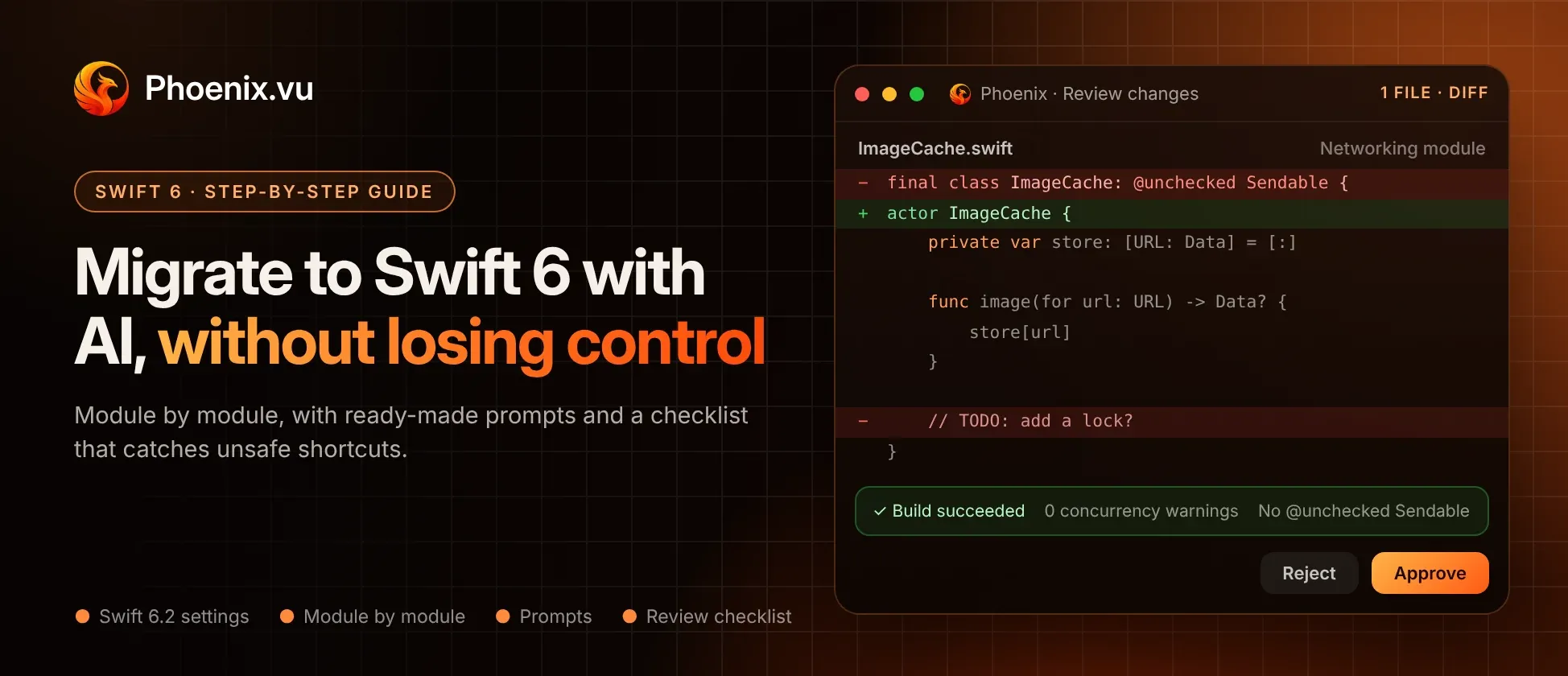
Phoenix shows each change as a diff you approve or reject. Read them with the checklist in the next section. Reject shortcuts and say why: "Don’t mark this class @unchecked Sendable; it has a mutable cache. Make it an actor instead." The agent will try again with that constraint.
08 Switch the module to Swift 6 and test
Once the module has no concurrency warnings, change its Swift language version to 6 and build. Run your test suite, then run the app on a real device and exercise the screens that the module touches. Concurrency bugs often show up only under real timing.
Before you commit, check for leaks the migration may have introduced. New Task { } blocks and AsyncStreams are the usual suspects. Phoenix’s Memory Diagnostics flags unstructured tasks that nothing cancels and stream continuations that never finish, alongside classic retain cycles. Then commit and move on to the next module.
09 Keep a list of what to revisit
Any escape hatch you accepted, such as a @preconcurrency import for a library that isn’t ready yet, goes on a short list with a reason. Revisit it when the library updates. Ship safe code today, and tidy the remaining edges later.
Prompts for each stage
Copy these and adapt them to your project.
Mapping (Step 2)
Don’t change any code yet. List the modules in this project and how they depend on each other. Find all singletons, global and static mutable variables, and classes with mutable state that are shared across threads. List third-party packages that don’t declare Sendable types. Suggest an order to migrate modules in, and explain why.
Turning on the settings (Step 3)
For the app target only, set Default Actor Isolation to MainActor and Approachable Concurrency to Yes. Don’t change any library targets. Show me the exact build settings you’ll change before you change them.
Fixing a batch (Step 6)
Strict concurrency checking is set to Complete for the Networking module. Fix all concurrency warnings in this module only. Rules: don’t use @unchecked Sendable or nonisolated(unsafe) on mutable state. Don’t add @MainActor to networking or parsing code. Don’t wrap code in Task {} just to silence an error. Prefer making types Sendable, using actors for shared mutable state, and keeping UI updates on the main actor. When you finish, list every place you used an escape hatch and why.
Understanding before fixing
Explain why this error happens in plain terms, and give me two ways to fix it with the trade-offs of each. Don’t change code yet.
Redirecting after a bad diff
You marked ImageCache as @unchecked Sendable, but it has a mutable dictionary. Convert it to an actor instead and update the call sites.
Checking your work (after each module)
Search the whole project for @unchecked Sendable, nonisolated(unsafe), @preconcurrency and assumeIsolated. For each one, tell me whether it’s still needed and whether there’s a safer alternative.
That last prompt is worth running even on code people wrote by hand. It gives you a list of every place the project trusts itself instead of the compiler.
Use this table when reading each diff. The middle column is what you want to see. The right column is what to question.
Review checklist: good fixes vs shortcuts
Eight common errors, and how to judge the fix| Error type | A good fix | A shortcut to question |
|---|
| Non-Sendable struct crossing a boundary | Make it Sendable when all stored values and the type's semantics support safe transfer. Otherwise, redesign the payload or keep it within its isolation domain. | Adding @unchecked Sendable without proving that the type is safe to transfer. |
| Class with mutable state shared across tasks | Prefer an actor. Alternatively, protect all relevant state access with a correctly implemented lock or another synchronization mechanism. | Adding @unchecked Sendable without synchronization or documented safety invariants. |
| View model touching UI from another isolation domain | Isolate UI-facing state with @MainActor; perform UI updates through actor-isolated methods or an explicit main-actor hop. | Using MainActor.assumeIsolated without establishing that execution is already on the main actor. |
| Static shared singleton | Prefer immutable Sendable state, actor isolation, or properly synchronized mutable state, depending on the design. | Using nonisolated(unsafe) on mutable global or static state merely to silence a diagnostic. |
| Third-party library not yet Sendable | Upgrade to a suitably annotated library where possible. Otherwise, use @preconcurrency import as a documented compatibility measure and revisit it later. | Treating @preconcurrency as proof of thread safety, or wrapping library types in @unchecked Sendable without verifying their safety. |
| Heavy work flagged as main-actor-isolated | Keep UI operations on @MainActor; move CPU-intensive work to an appropriate execution context. An async @concurrent function is one Swift 6.2 option. | Marking the entire type @MainActor just to suppress errors, potentially blocking the UI with expensive work. |
| Closure capturing self across tasks | Capture only necessary values, satisfy Sendability and isolation requirements, and manage task lifetime and cancellation. | Using nonisolated(unsafe) or @unchecked Sendable to bypass capture-safety diagnostics without proving safety. |
| Synchronous code that needs to call asynchronous code | Make the caller async and propagate await where possible. At a synchronous boundary, start a task with explicit ownership, error handling and cancellation where appropriate. | Creating a fire-and-forget Task { } solely to silence an error, with no plan for lifetime or cancellation. |
Three questions to ask about every diff
- Does this change what the code does, or only what the compiler thinks?Real fixes often change structure: a class becomes an actor, work moves to the right thread. Pure annotations deserve a second look.
- Would I be comfortable explaining this in code review?If an escape hatch needs a comment to justify it, ask the agent to add one, or pick a different fix.
- Did the agent stay inside the module I gave it?A concurrency fix that reaches into five other modules is harder to review and harder to roll back.
None of these escape hatches is banned. Each exists for real cases. The goal is to use them on purpose, with a reason written down, rather than by default.
Common questions
Do I have to migrate to Swift 6 language mode?
Not yet. Swift 5 mode is still supported, and you can adopt strict checking gradually. But new Apple APIs and many packages increasingly assume Swift 6 concurrency, so the longer you wait, the bigger the job tends to get.
Can an AI agent migrate a whole app to Swift 6 in one go?
It can try, and the build may even pass. But one giant diff is almost impossible to review, and that’s exactly where unsafe shortcuts slip through. Module by module is slower on paper and much safer in practice.
Is @unchecked Sendable always wrong?
No. It’s right for a class that really is thread-safe, for example one that protects its state with a lock. It’s wrong as a way to make an error disappear. If you or the agent use it, add a comment explaining why the type is safe.
Will main actor by default fix everything?
It removes many errors in app code, because most app code touches the UI anyway. It won’t fix shared mutable state in background work, and it’s usually a poor fit for libraries. Treat it as a strong starting point, not the whole migration.
How long does a migration take with an agent?
It depends on the size of the codebase and how much shared mutable state it has. The agent speeds up the typing a lot. Review and testing still take human time, and they should.
Is it safe to let an AI change my concurrency code?
It’s as safe as your review. Commit before each batch, review every diff against the checklist above, and test on a real device. Phoenix shows every change as a diff you approve or reject, asks before changing build settings, and can restore any file it touched. For more, read Is It Safe to Use an AI Coding Agent?