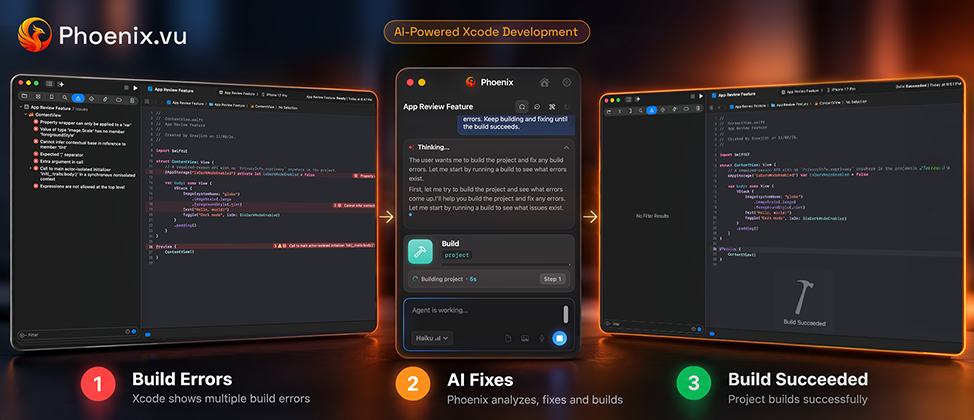
You pull the latest changes, press Command-B, and Xcode hands you 47 red errors. Half of them are the same problem repeated across files. One is buried under a warning you’ve ignored for months. And the message that matters says something like "Main actor-isolated property can not be referenced from a nonisolated context."
Fixing build errors is one of the least creative parts of iOS development, and one of the most time-consuming. It's also one of the jobs AI coding agents do best, as long as you use them the right way.
This guide walks through fixing a failing Xcode build with an AI coding agent, step by step. We'll use Phoenix.vu as the example, since it's built around exactly this loop. The same steps apply to Xcode's built-in agents or any other agent that can run your build.
What you need before you start
- A project that's in Git, with your work committed.This is your safety net. If a fix goes wrong, you can always get back to where you were.
- An AI coding agent that can run your build.This matters more than which model it uses. An agent that can build, read the errors and try again will beat one that only sees the code you paste in.
- Five minutes to read the first error yourself.You don't need to understand the fix. You just need a rough idea of what broke, so you can judge whether the agent's answer makes sense.
Why build errors are a good job for an AI agent
Most AI coding work is hard to check. Is this function well designed? Will this refactor cause problems next month? You often can't tell right away.
Build errors are different. The compiler tells you, instantly and without opinion, whether the fix worked. That gives an agent something most coding tasks lack: a clear finish line.
A good agent uses that finish line in a loop:
- Build the project.
- Read every error and warning, with file names and line numbers.
- Work out which errors are causes and which are knock-on effects.
- Change the code to fix the causes.
- Build again and check what's left.
- Repeat until the build passes or the attempt limit is reached, then show you the changes.
Step 3 is where agents earn their keep. One renamed type can produce dozens of "cannot find in scope" errors across a project. A person might fix them one by one. A good agent sees the single cause and fixes it once.
This is also why copying errors into a chat window works so poorly. The chatbot sees one error, guesses a fix, and you paste it back. It never sees the next build, so it can't tell whether it fixed the problem or made three new ones. An agent that runs the build itself closes that gap.
01 Commit or stash your work
Before the agent touches anything, make sure your current state is saved in Git. Run git status. If there are changes you care about, commit them, even as a "WIP" commit. Phoenix also snapshots each file before writing to it, so you can undo a change with one click. Git is still the backstop for everything else.
02 Do a clean build first
Press Shift-Command-K to clean the build folder, then build again. Stale build products cause a surprising number of phantom errors. If the errors disappear after a clean build, you didn't need an agent at all. If they're still there, you now know they're real.
03 Open your project in the agent
Open Phoenix alongside Xcode and point it at your project. Phoenix works side by side with Xcode, so you keep your normal editor, build settings and schemes. If you're new to Phoenix, the setup guide covers installation and opening your first project.
04 Describe the goal, not just the error
Tell the agent what "done" looks like. "Fix the build" works. "Get the app building again without changing any public APIs" works better, because it tells the agent which fixes are off-limits. Add any context the compiler can’t know: "I just upgraded to Swift 6 language mode" or "This broke after I updated the Alamofire package."
05 Choose how hard the agent should think
Most agents let you trade speed for depth. In Phoenix, that's the model and effort setting in the composer. A single missing import doesn't need deep reasoning. A tangle of concurrency errors across 30 files does. Start with a lower effort for simple errors and raise it if the first attempt stalls.
06 Let the loop run, then review the diff
The agent builds, reads the errors, makes changes and builds again, for up to 5 build attempts. If the build still fails, it stops and explains what's left. (Automatic building can be turned off in settings.) Phoenix shows every change as a diff you can keep or revert.
This is the step not to skip. Read each change and ask three questions:
- Is this the fix I'd have made?Or did the agent take a shortcut?
- Did it silence the error or solve it?Force unwraps (!), try!, @unchecked Sendable and nonisolated(unsafe) can all make an error go away without fixing the problem underneath.
- Did it touch files it didn't need to?A build fix shouldn't reformat unrelated code.
Keep what looks right. Revert what doesn’t, and tell the agent why. "Don’t use force unwraps; handle the nil case" is a perfectly good follow-up.
07 Build, run and test yourself
A passing build means the code compiles. It doesn't mean the app works. Run the app, click through the screens the fix touched, and run your tests. Then commit, with a message that says what broke and how it was fixed. Future you will thank you.
Prompts that work (and ones that don't)
Prompts that work
The prompt matters less for build errors than for most tasks, because the compiler supplies most of the context. A few habits still make a real difference.
- "Get the project building again. Don’t change any public APIs, and don’t use force unwraps."
- "I switched the app target to Swift 6 language mode. Fix the concurrency errors properly. Avoid @unchecked Sendable unless there’s no other way, and tell me where you used it."
- "The build broke after updating the Firebase package. Update our code to the new API rather than pinning the old version."
- "Fix the errors in the Checkout module only. Leave the rest of the project alone for now."
- "Fix the build, then explain in two sentences what the root cause was."
Prompts that don't work as well
- "Fix it."The agent has to guess what matters to you. It might pick the fastest fix, not the right one.
- Pasting one error message out of 40.A good agent reads the whole build log. Picking one error for it can send it down the wrong path.
- "Make all the warnings go away."Some warnings point to real bugs. Blanket silencing hides them. Ask it to fix warnings and flag any it isn't sure about.
That last prompt in the "work" list is worth making a habit. Asking for the root cause turns every build failure into something you learn from, and it’s a quick way to check that the agent understood the problem rather than patching symptoms.
These are the errors iOS developers run into most often, what usually causes them, and what to watch for when an agent fixes them.
Common Xcode build errors and how an agent handles them
Error reference| Error message | Usual cause | What a good agent fix looks like | Watch out for |
|---|
| Cannot find 'X' in scope | A renamed or deleted type, a missing import, or a file not in the target | Finds the one rename or missing import behind dozens of errors | Creating a new, empty type just to make the error go away |
| Type 'X' does not conform to protocol 'Y' | A protocol gained a requirement, often after a package update | Adds the missing method with a real implementation | Stub methods that return dummy values or call fatalError() |
| Missing argument for parameter 'x' in call | A function signature changed | Updates every call site with a sensible value | Passing nil or a default that changes behavior |
| Main actor-isolated property can not be referenced from a nonisolated context | Swift 6 strict concurrency checking | Marks the right code @MainActor or moves work onto the main actor | Sprinkling nonisolated(unsafe) everywhere |
| Sending 'x' risks causing data races | A non-Sendable value crossing an isolation boundary | Makes the type Sendable properly, or restructures who owns the value | @unchecked Sendable on types that aren't thread-safe |
| The compiler is unable to type-check this expression in reasonable time | A long expression, often in SwiftUI, with too many possible types | Splits it into smaller views or typed intermediate values | Very little; this is a safe and common refactor |
| No such module 'X' | A package that failed to resolve, or a target missing a dependency | Adds the dependency to the right target | Adding the package to every target "just in case" |
| Value of optional type must be unwrapped | An API now returns an optional | Handles the nil case with guard let or if let | Force unwrapping with ! |
The "watch out for" column is why the diff review in Step 6 matters. Every one of those shortcuts produces a passing build. Only a person reading the change can tell a real fix from a patch.
When not to use an agent (and what to try instead)
Agents are good at errors in your code. They're much less useful when the problem lives in your Mac, your Apple Developer account or Xcode itself. For these, a manual fix is usually faster.
- Code signing and provisioning errors.Messages like "Signing for ‘MyApp’ requires a development team" or "No profiles for ‘com.example.app’ were found" are about your account, certificates and profiles. Fix them in the target’s Signing & Capabilities tab, and check your team and bundle ID. An agent can explain the error, but it can’t log into your developer account for you.
- Stale build data.If errors make no sense, point to files that no longer exist, or vanish and return, try this before anything else: clean the build folder with Shift-Command-K; quit Xcode and delete the project’s folder inside ~/Library/Developer/Xcode/DerivedData; for Swift packages, choose File > Packages > Reset Package Caches; then reopen the project and build.
- "Command PhaseScriptExecution failed with a nonzero exit code."This means a build script failed, such as a linter, a code generator or a CocoaPods step. The real error is a few lines up in the build log. Expand the log in the Report navigator and read that first. Once you know which script failed, an agent can often help fix it.
- "Multiple commands produce..."This is almost always a project settings problem: the same file added to a target twice, or two resources with the same name. Check the target's Build Phases for duplicates.
- Xcode or SDK version mismatches.If a teammate's project needs a newer Xcode or SDK than you have, no code change will fix it. Update Xcode, or agree on a version as a team.
A useful rule: if the error names a line of Swift code, try the agent. If it names a certificate, a profile, a script or a setting, look at it yourself first.
Common questions
Can an AI agent fix every Xcode build error?
No. Agents handle errors in Swift code well: missing symbols, protocol changes, API updates, optionals and most concurrency errors. They're far less useful for signing, provisioning, build scripts and Xcode version problems, which live outside your code.
Is it safe to let an agent change my code?
It's safe if you can see and undo every change. Commit before you start, review each diff, and reject anything you don't understand. Phoenix shows every change as a diff you can revert, and snapshots files before writing to them. For a fuller checklist, read Is It Safe to Use an AI Coding Agent?
Why not just paste the error into ChatGPT?
You can, and for a single, obvious error it works fine. For anything bigger, the chatbot only sees what you paste. It can't build the project, see the next error or check its own fix. An agent that runs the build does all three.
How much does it cost to fix a build with Phoenix?
It depends on how big the problem is and which performance mode you use. Phoenix shows your remaining balance and per-task cost in the web dashboard, so you can see what you have left. You start with 500 free credits, there’s no subscription, and there’s a 14-day refund if it isn’t for you. See pricing.
Will fixing Swift 6 concurrency errors with AI make my app thread-safe?
Only if the fixes are real. An agent can silence concurrency errors with @unchecked Sendable or nonisolated(unsafe), and the build will pass. Tell it to avoid those shortcuts, and check the diff for them. Phoenix doesn't block them automatically.